Field notes / MadHacks 2026 / Madison, WI
Your internet's acting weird.
Is it your Wi-Fi, your router, your provider, or is someone lying to you?
Owl / built solo this weekend by Cole Munz
Sample 01 / The lying part is real / April 7, 2026
In April, the FBI had to reset hijacked home routers in the US.
A court-authorized operation sent hijacked TP-Link routers commands that, in the Justice Department's words, force routers to obtain legitimate DNS resolvers from their Internet Service Providers (ISP).
1
In the targeted cases, Microsoft says, the attackers' server would then present an invalid TLS certificate.
2That bad certificate is the signal Owl looks for.
1 US Department of Justice, press release 26-324, April 7, 2026 / 2 Microsoft Threat Intelligence, April 7, 2026
- thousands
- of TP-Link routers worldwide with stolen logins, says the Justice Department. It gives no exact count.1
- more than 23
- states where routers were weaponized, says the FBI's Boston office.1
- 5,000
- consumer devices, and over 200 organizations, hit by the attackers' DNS servers. Microsoft's count.2
Sample 02 / What Owl does
One button. Owl digs down until it has proof.
- It checks every layer: Wi-Fi, router, DNS, internet.
- If the network sent you to a fake, it says so in one plain sentence.
- The proof is one tap down. A real site can show a certificate. A fake can't.
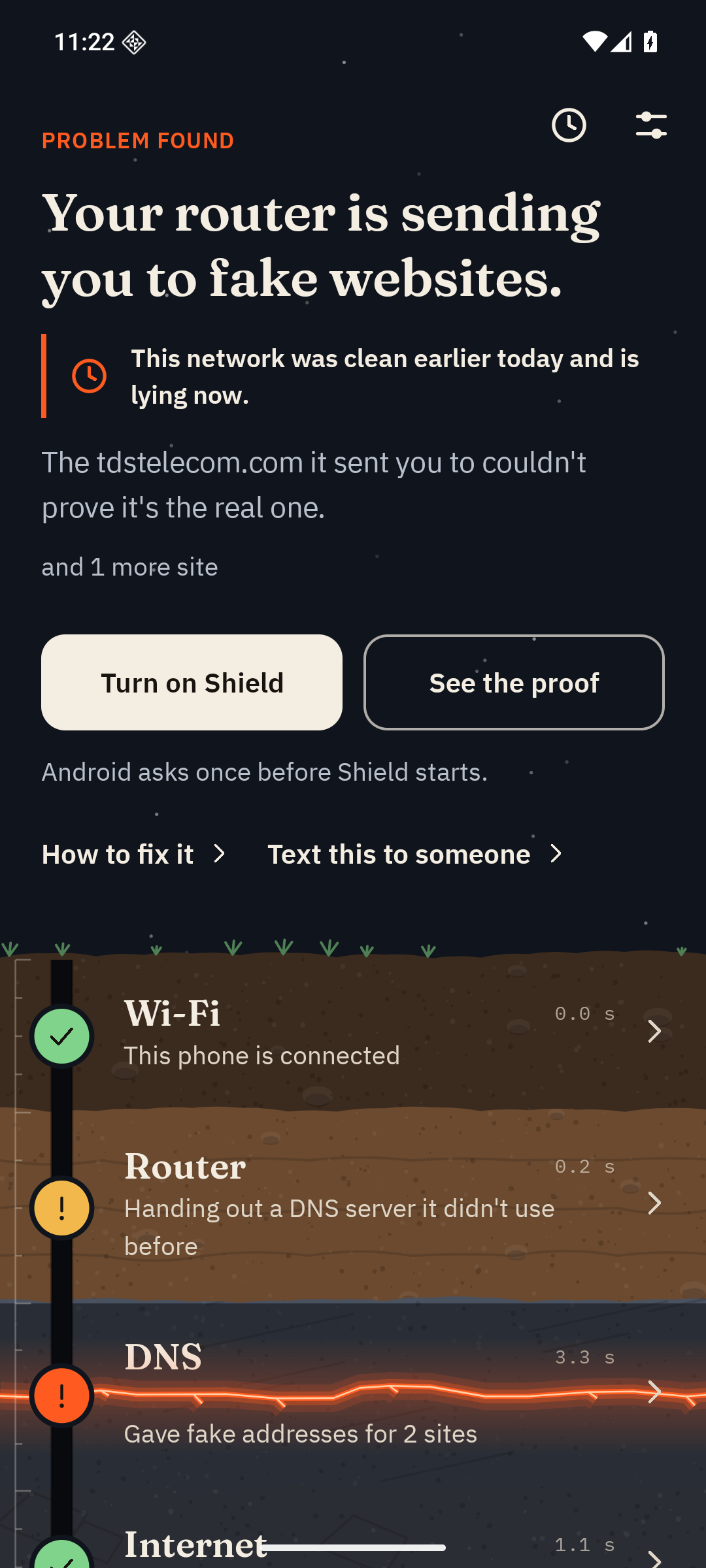
Sample 03 / Live / the phone gets its answers from this laptop
This laptop is playing a hacked router.
It only lies to devices pointed at it. My phone is one of them.
1Tap Dig
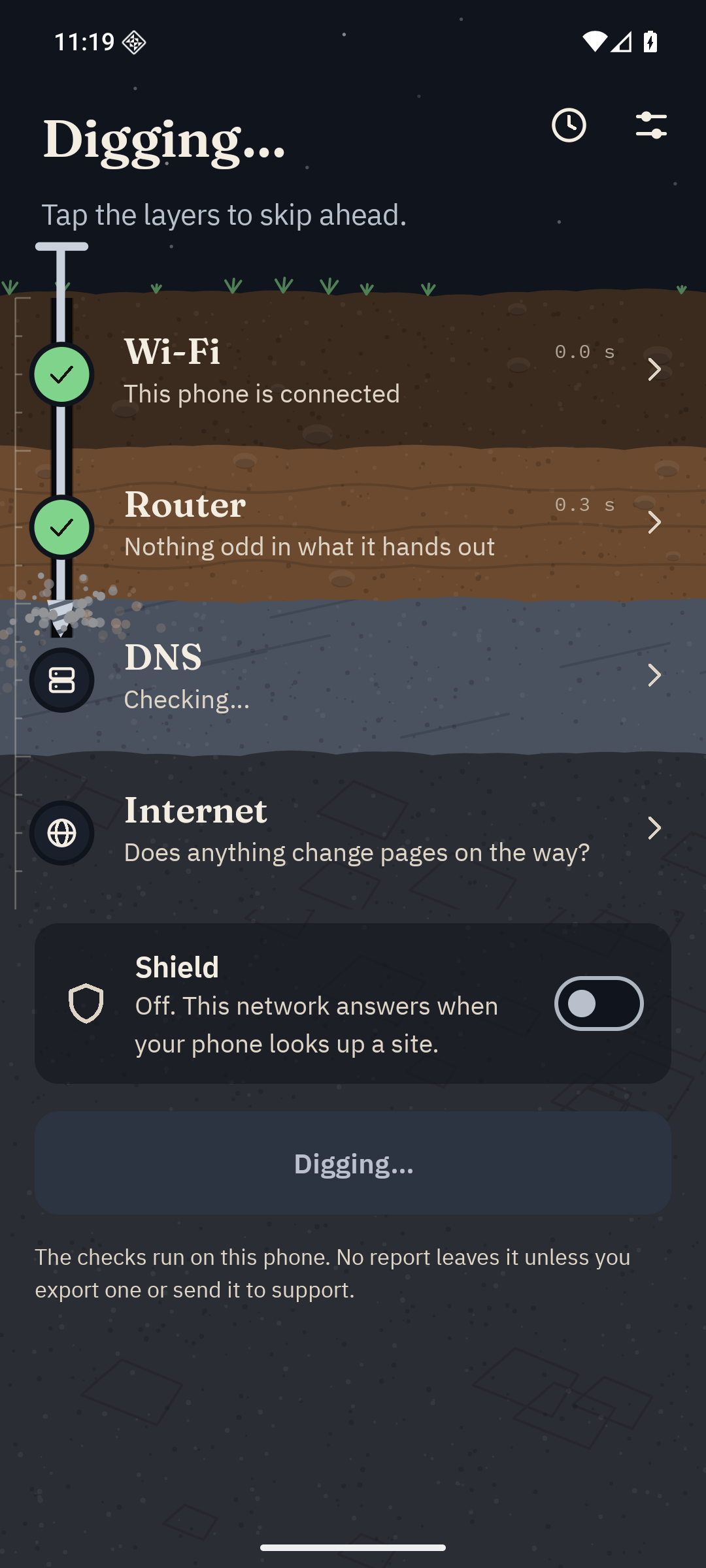
2The DNS layer cracks

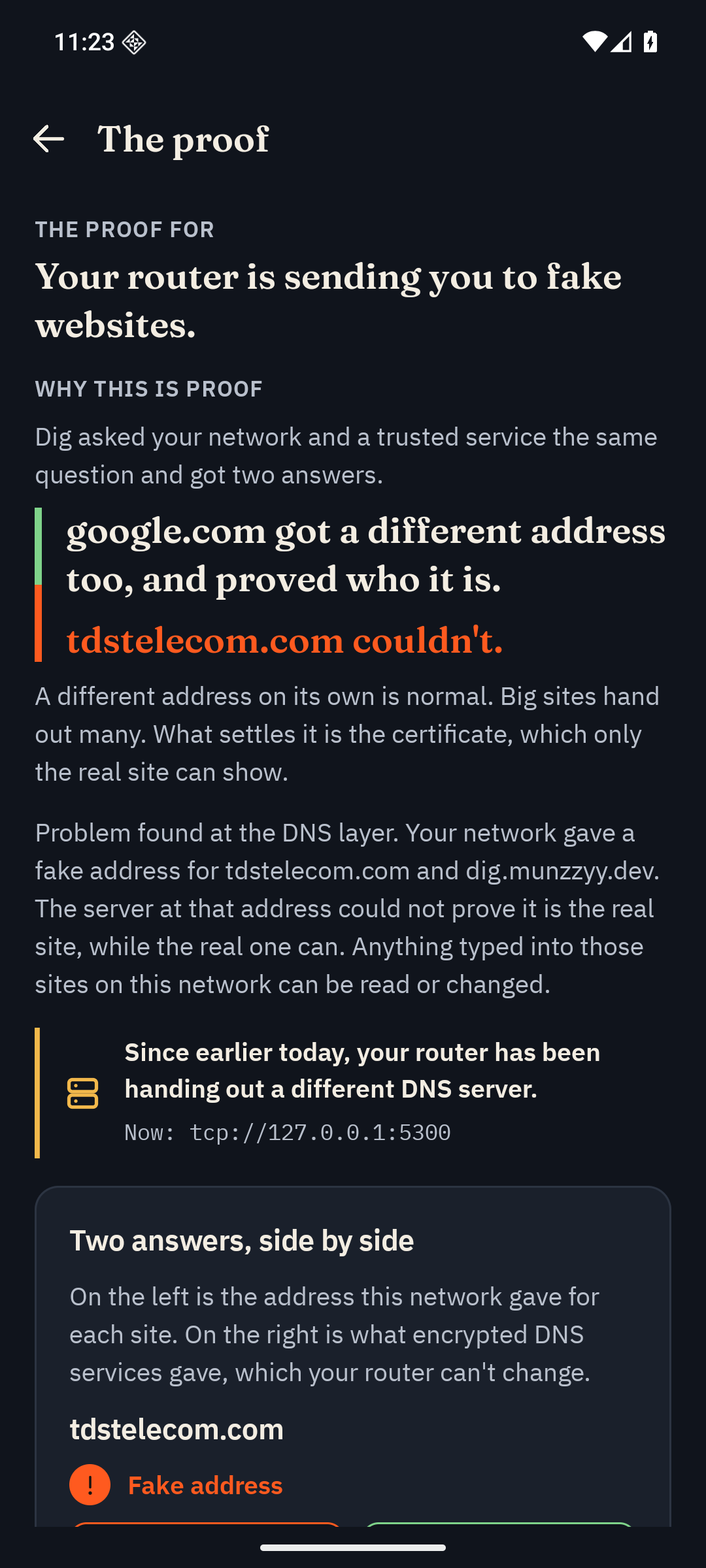
3See the proof
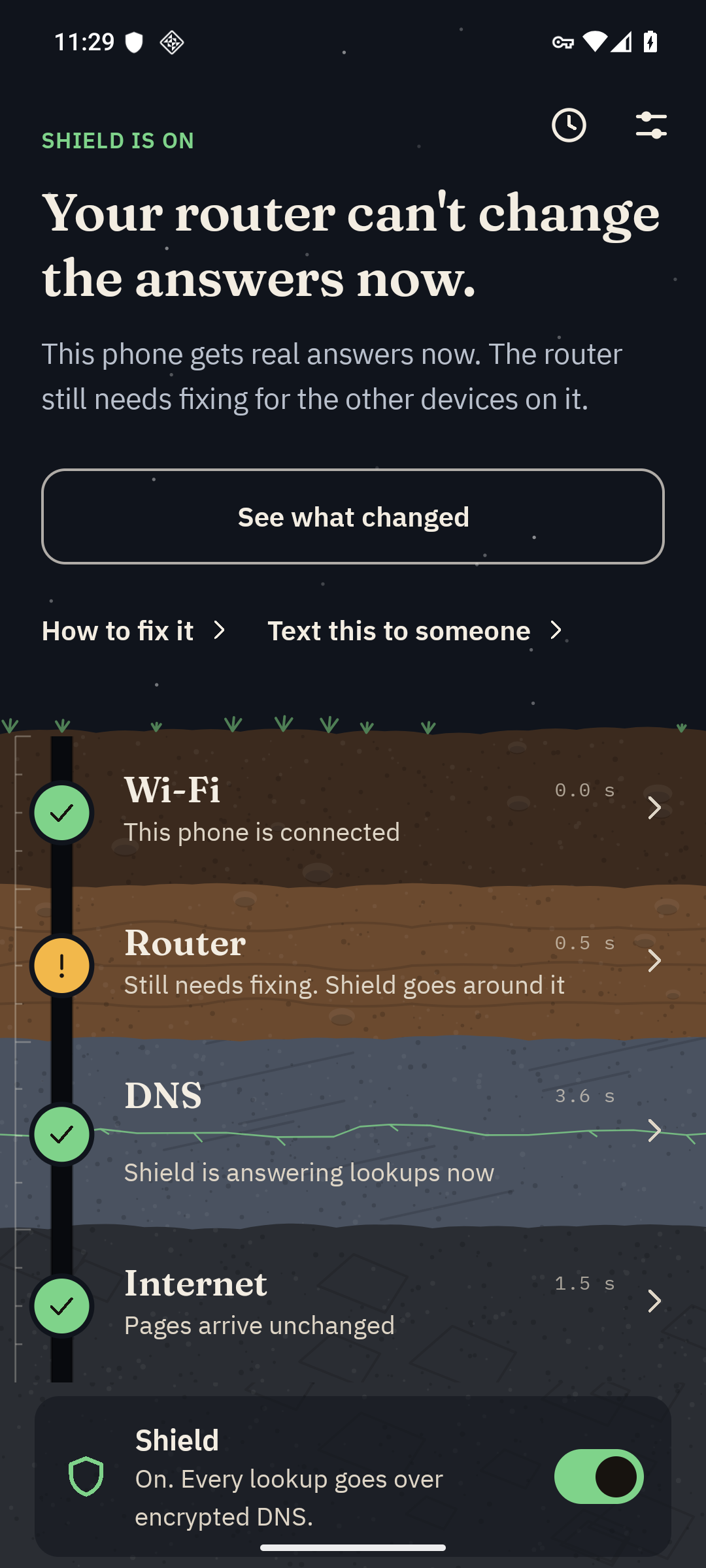
4Turn on Shield
Sample 04 / The proof / measured, not promised
A different address proves nothing. A failed certificate does.
- The network said
- tdstelecom.com
is at 10.42.0.1 - Encrypted DNS said
- tdstelecom.com
is at 203.0.113.20 - Owl asked 10.42.0.1 to prove it is tdstelecom.com
- shown as CN=dig-demo, signed by CN=dig-demo
not signed by anyone the phone trusts
Fake, with proof
- 0
- false alarms in 770 checks: 154 sites through five honest DNS services
- 20 of 20
- lies called fake, with the demo router lying about 20 names on each list
- 54 of 54
- sign-in pages called fake when it lied about every one
Demo data. 203.0.113.20 is a made-up example address. Numbers: docs/ACCURACY.md, run November 15, 2026, on a computer with the app's engine.
Sample 05 / Who it's for
Anyone whose internet is acting weird, and whoever they call for help.
- At home
- It tells you if your network is lying to you, and shows the proof.
- A parent, and the kid who helps
- The verdict is one sentence a grandparent can read out over the phone.
- Hotel or cafe Wi-Fi
- Run it before you sign in to anything.
- Company IT
- Home side or work side, and the answer goes to IT, not a guess.
- A provider like TDS
- The customer arrives with the diagnosis, and several homes on one rogue server shows up as a campaign.
Nobody uses Owl yet. It is a weekend build. Owl is not made by or affiliated with TDS Telecom or any other company named.
Owl / MadHacks 2026 / thank you
Owl proves your home internet is lying, fixes it on your phone, and tells the people who can fix the router.
An Android app, a support desk for the provider, and a guard for the router. Built solo at MadHacks 2026.
The app and the write-up
owl.munzzyy.devThe source
gitlab.com/Munzzyy/owl
Below the talk / backup slides
Questions
Backup / The method
How the check works
- Ask twice. Owl asks the network's DNS where a site lives. Then it asks Cloudflare and Google, plus Quad9 on newer phones, over encrypted DNS. It reaches them by IP address and checks their certificates, so the router has no say in it.
- Make the address prove who it is. An address no encrypted provider gave has to show the site's certificate. Owl checks it against the phone's own list of trusted signers, and nothing else.
- Check that the check is fair. On the same network google.com came back with a different address too, and proved it is google.com. That passing site is on the proof screen.
A mismatch alone is never called bad. Anything Owl can't settle is a warning or unknown.
The idea is not mine alone. Comparing a network's answer with a trusted one, and settling it with a TLS handshake, is what OONI Probe does to measure censorship. Owl's part is running it on the phone, treating the failed certificate as the proof, and then doing something about it.
Backup / The rules, in order
How a verdict is reached
- The network's address is one an encrypted provider also gave.Same
- Different, and its certificate is valid for the name.Genuine
- Different, its certificate fails, but the real address shows the same trusted certificate.Genuine
- Different, its certificate fails, and the real address has a bad certificate too.Warning
- Different, its certificate fails, and none of the above applies.Fake
- Different, nothing accepts a connection there, and the real address has a valid certificate.Fake
- Anything else, including an address that only times out.Warning
Only this check can say fake. Every other check stops at a warning. If no encrypted provider answers, the result is unknown.
Backup / docs/ACCURACY.md / run November 15, 2026
Accuracy, the whole run
Honest networks
- 0 false alarms in 770 checks. 100 popular sites and the 54 names the app ships, through five honest DNS services.
- Between 9 and 27 names per service on the sign-in list came back with a different address and proved genuine. A tool that flagged every different address would have called those fake.
- The first run did find one false alarm. The rule was wrong. It is fixed, with a test that fails if the fix is taken out.
The demo router, lying
- 20 of 20 called fake when it lied about 20 names, on both lists.
- 54 of 54 sign-in pages called fake when it lied about every one.
- 98 of 100 popular sites called fake. 2 got a warning, 0 passed as clean.
What it does not show
- It ran on a computer with the app's engine, not on a phone.
- Four runs, all from one desk. 154 names.
Backup / docs/THREAT_MODEL.md
What Owl can't catch
- A lie about a name it never asks about. Owl checks its list and the sites you add, not every site.
- Traffic passed through untouched. A router that only watches gives Owl nothing to prove. HTTPS covers you there.
- A valid certificate that should never have been issued. Owl notes a certificate with no transparency record, and does not look it up in the logs.
- A phone that is already compromised. Malware can lie to Owl the way it lies to the browser.
- A network that blocks every encrypted DNS address. Owl warns and stops. It does not tunnel around the block.
- A copy of your Wi-Fi at the radio level. That needs the location permission, and Owl never asks for it.
- An interceptor that plays along with the two test questions. That check has only met stand-ins.
- Other devices in the house. Shield protects the phone it runs on. The router fix is for the rest.
Backup / docs/PRIVACY.md
What leaves the phone
During a dig
- Lookups for the names on the check list, to the network's own DNS server, and over HTTPS to Cloudflare and Google, plus Quad9 on newer phones.
- One TLS handshake to an address that differs from every encrypted answer, and to three sites at their real addresses.
- With technical detail on: one connection to each site on the list, a page from example.com, and one plain request to paypal.com.
- Who owns an unfamiliar DNS server, asked of the public registry. Only that server's address is sent.
Never
- Your public address in a request, your name, your location or your Wi-Fi name.
- Analytics, crash reports or any third-party SDK.
- A report, unless you send it yourself. Each send shows the summary first and asks.
History stays on the phone, out of cloud backup, and goes when you uninstall.
Backup / The fix on the phone
Shield sends the phone's lookups around the router.
- A local VPN that carries only DNS. Lookups go over HTTPS to an encrypted DNS provider, so the router can't change the answers.
- Why a VPN. A normal Android app is not allowed to change the phone's Private DNS setting. Android's own manifest marks that permission
Not for use by third-party applications.
- You pick the provider: Cloudflare, Quad9 or Google.
- Its limits. It covers this phone only, Android runs one VPN at a time, and a network that blocks every encrypted DNS address stops it.

Sources: Android Open Source Project, platform manifest / Android developer reference, VpnService
Backup / The provider's side
The support desk, and the campaign spotter
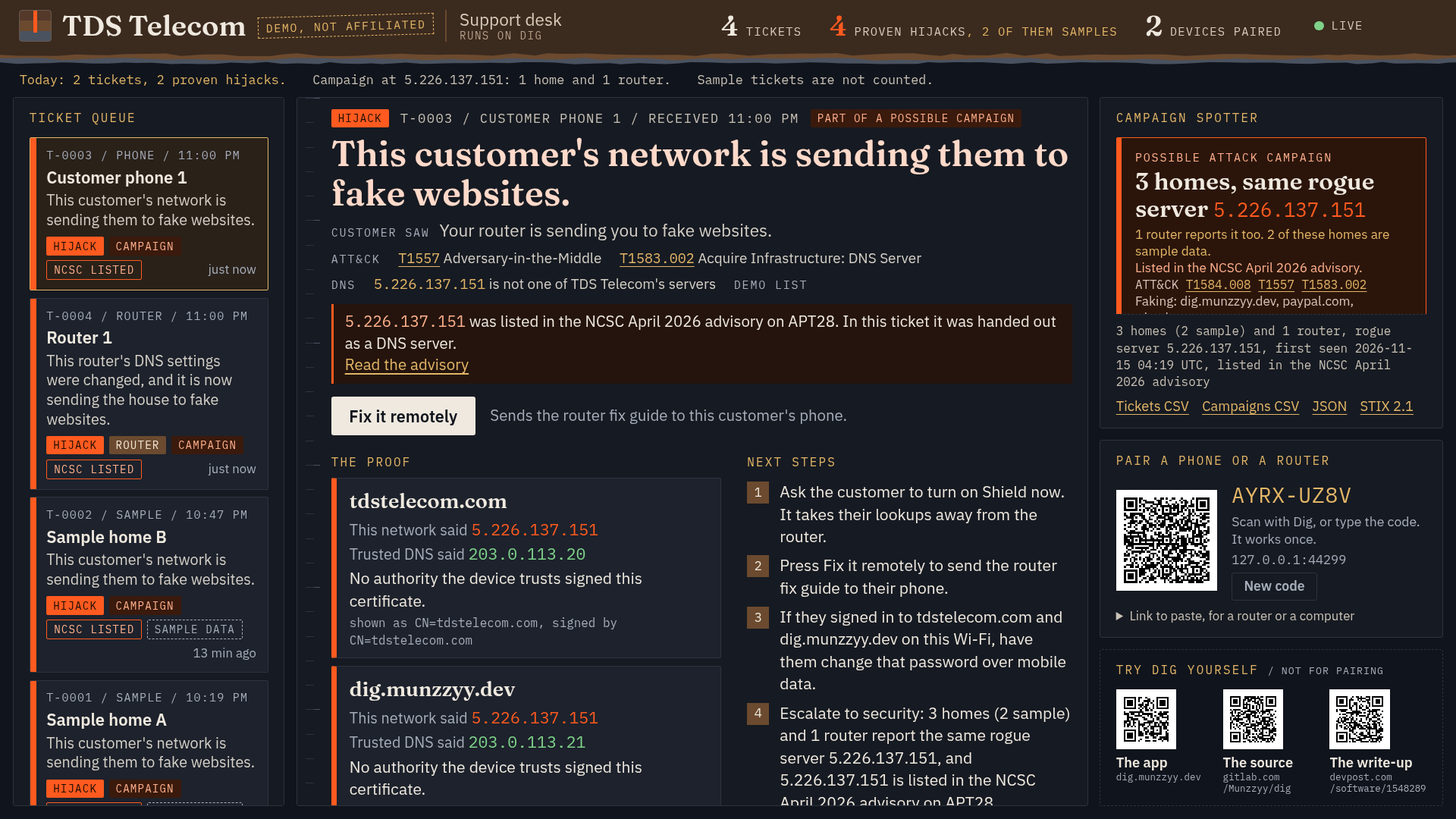
- The ticket says what's wrong, when, and the proof: the certificate the fake server showed.
- Fix it remotely. The agent presses one button and the fix guide opens on the customer's phone by itself.
- A campaign. Tickets that name the same rogue server are grouped: several homes, one server.
- For a security team. Tickets carry MITRE ATT&CK techniques, and a campaign exports as STIX 2.1 that passes the OASIS validator.
Backup / The router side
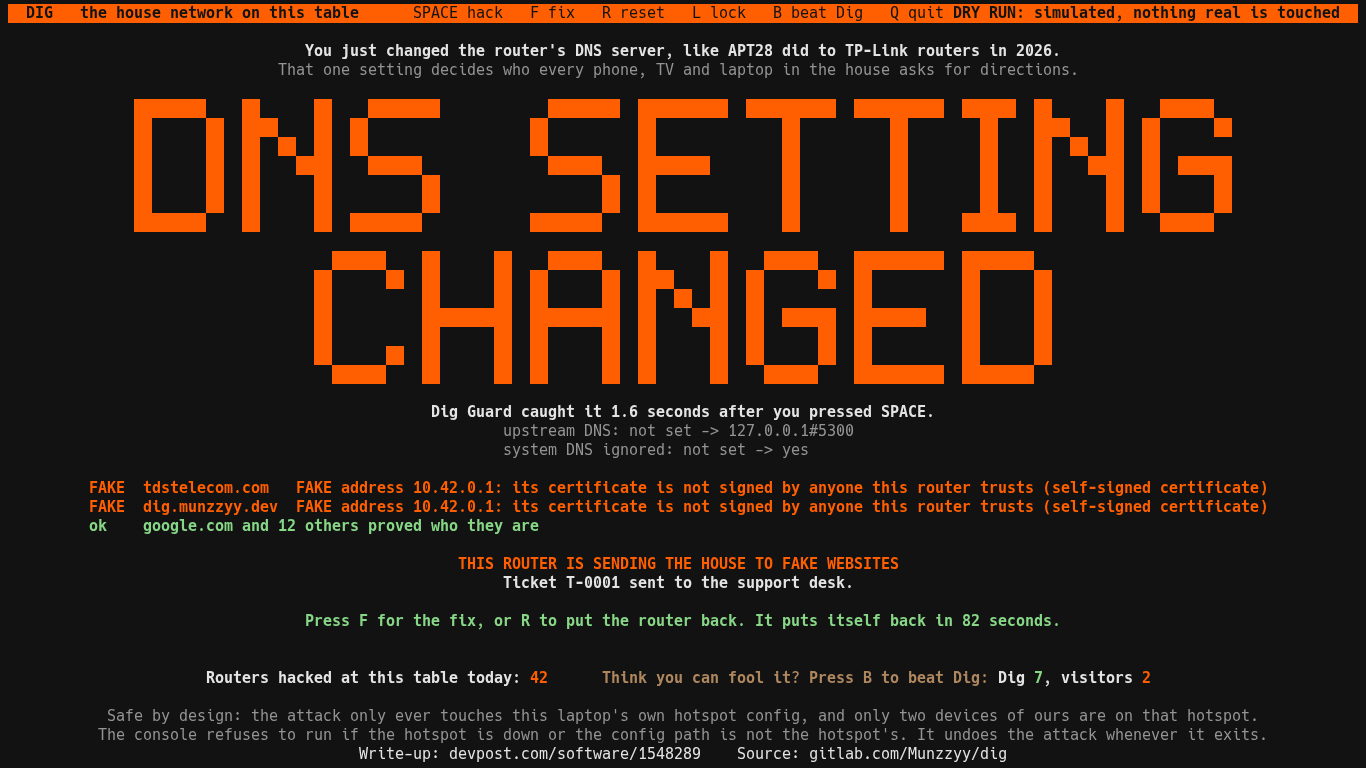
Owl Guard watches the setting the whole house follows.
- It watches the router's own DNS settings and says so within about two seconds of a change, with what it was and what it is now. It now reads the NAT rules for redirected traffic too.
- It proves it with the same certificate check as the phone, then sends the desk a ticket marked as coming from a router.
- Lock mode, off unless you ask for it, pins DNS to encrypted DNS and undoes any change.
- One Python program, no dependencies, no open ports.
- Its limits. It is written for Linux and OpenWrt. It has not run on a real home router, and it can't install on eero.
Backup / Same engine, phone or laptop
The same check from a laptop
$ cd android && ./gradlew -q :core:dig Owl checks if this network is lying to you Wi-Fi checks out Connected over this computer's network. Router checks out Your router answers DNS lookups itself. DNS problem found Your network gave a fake address for tdstelecom.com. Internet checks out Plain web traffic arrives untouched. Sites FAKE tdstelecom.com FAKE address 10.42.0.1: its certificate is not signed ok google.com different address, valid certificate for google.com ok wikipedia.org same address as the trusted resolvers PROBLEM FOUND Problem found at the DNS layer.
The checks live in a plain Kotlin module with no Android in it. The app, this command and the accuracy run all call the same code.
Shortened sample from the README, run against the demo router.
Backup / fuzz/RESULTS.md and the README
Fuzzing and tests
- 29.9 billion
- broken inputs in the long runs, thrown at the DNS, packet, certificate-name, JSON and desk code. The fuzzer has 20 targets now, and the newest have had short passes only.
- 7 bugs
- found in the first half hour. All 7 are fixed, each with a test. Since the fixes: 26.2 billion inputs and zero crashes.
- 1,655 tests
- 1,645 passing and 10 skipped because they need a live network. Counted November 15, 2026.
None of the 7 bugs let anyone take over the phone. I say that so nobody thinks I'm hiding a hole.
Android lint reports 0 errors, and the semgrep run is written up in the threat model. Strings from the network, like certificate names, are treated as hostile: capped in length and never rendered as markup.
Backup / docs/USE_CASES.md
Which companies it fits
- Internet providers
- The desk and Guard are provider-neutral. The name, the support wording and the fix guide come from one config file. TDS is the demo config.
- Company IT
- An employee at home runs Owl and the ticket goes to the company's own desk. Several home routers on one rogue server is an early signal.
- Managed service providers
- Guard on the office router, with tickets going to the provider's desk.
- Bank support teams
- Ask a customer to run Owl when a phishing call sounds like a hijacked router.
- Security teams
- ATT&CK tags on each ticket, a STIX 2.1 export, and the 182 server addresses from the NCSC's April 2026 advisory matched on the phone.
Nobody listed here uses Owl. These are the cases I had in mind while building it.
Backup / The honest list
What isn't done
Today
- Android only.
- Owl sees only the names it checks: its list of 54 and the sites you add.
- Guard has not run on a real home router.
- The check for a network that catches DNS has only met stand-ins.
Before a real pilot
- The desk is one program on one machine. It holds tickets in memory and has no agent accounts.
- It trusts the evidence a paired phone sends and does not check it again.
- The accuracy runs were all from one desk, on a computer and not a phone.
Everything on this slide is written down in the README and the threat model.